

Oracle 19c Patch Guide — Standalone Grid + Database Home
Release Update 19.30.0.0.260120 | OJVM RU 19.30.0.0.260120 | Patch Bundle 38658588
Target Host: dataveralabs-db01
Prerequisites
Before starting the patching activity, download all required patch components from Oracle Corporation support (MOS). The required software for this patch cycle includes Patch Bundle 38658588 for Oracle 19c Release Update 19.30.0.0.260120, OJVM Patch 38523609, and the latest OPatch utility p6880880_190000_Linux-x86-64.zip.
STEP 1 — Backup Oracle Home and Grid Home
Before any binary change, take filesystem backups of both Oracle homes to preserve permissions and provide rollback capability.
# Backup Database Home
tar -cvpzf /backup/DBHOME_PREPATCH_$(date ‘+%F’).tar.gz /u01/app/oracle/product/19.0.0/db_1
# Backup Grid Home
tar -cvpzf /backup/GRIDHOME_PREPATCH_$(date ‘+%F’).tar.gz /u01/app/19.0.0/grid
The -p flag preserves ownership, permissions, and SUID bits required for Oracle binaries.
STEP 2 — Upgrade OPatch in Both Homes
Unzip latest OPatch utility (p6880880) into both Oracle Home and Grid Home.
$ unzip -o p6880880_190000_Linux-x86-64.zip -d /u01/app/oracle/product/19.0.0/db_1/
$ unzip -o p6880880_190000_Linux-x86-64.zip -d /u01/app/19.0.0/grid/
Verify both homes report same OPatch version:
$ORACLE_HOME/OPatch/opatch version
$GRID_HOME/OPatch/opatch version
STEP 3 — Shutdown Database
Stop database cleanly before patching:
$ srvctl stop database -d DATAVERA
$ srvctl status database -d DATAVERA
Confirm no PMON process remains running before continuing.
STEP 4 — Apply Grid and DB Binary Patch Using opatchauto
Switch to root and run opatchauto from Grid Home.
$ su – root
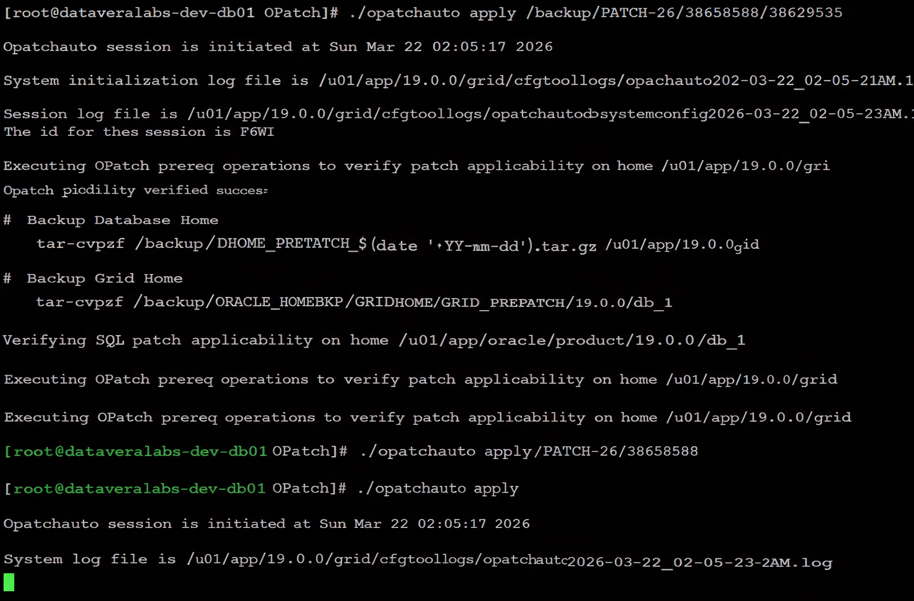
$ /u01/app/19.0.0/grid/OPatch/opatchauto apply /backup/PATCH-26/38658588
Monitor logs for:
Patch applicability verified successfully on home /u01/app/19.0.0/grid
Binary patch applied successfully on home /u01/app/19.0.0/grid
Prepatch CRS log:
/u01/app/grid/crsdata/dataveralabs-db01/crsconfig/hapatch_2026-03-22_02-09-44AM.log
STEP 5 — Apply OJVM Patch to Database Home
After opatchauto completes successfully, switch to oracle user and apply OJVM patch.
$ su – oracle
$ export ORACLE_HOME=/u01/app/oracle/product/19.0.0/db_1
$ cd $ORACLE_HOME/OPatch
$ ./opatch apply /backup/PATCH-26/38658588/38523609
Expected result:
Patch 38523609 successfully applied.
OPatch succeeded.
OJVM patch must always be applied after DB RU binary patch.
STEP 6 — Start Database and Open All PDBs
Start database after binary patching completes.
$ srvctl start database -d DATAVERA
$ sqlplus / as sysdba
SQL> alter pluggable database all open;
Verify PDBs are open before datapatch.
STEP 7 — Run datapatch -verbose
Apply SQL changes into dictionary and all open PDBs.
$ cd $ORACLE_HOME/OPatch
$ ./datapatch -verbose
SQL Patching tool version 19.30.0.0.0 Production on Sun Mar 22 06:10:22 2026
Copyright (c) 2012, 2026, Oracle. All rights reserved.
Log file for this invocation: /u01/app/oracle/cfgtoollogs/sqlpatch/sqlpatch_3730217_2026_03_22_06_10_22/sqlpatch_invocation.log
Connecting to database…OK
Gathering database info…done
Note: Datapatch will only apply or rollback SQL fixes for PDBs
that are in an open state, no patches will be applied to closed PDBs.
Please refer to Note: Datapatch: Database 12c Post Patch SQL Automation
(Doc ID 1585822.1)
Bootstrapping registry and package to current versions…done
Determining current state…done
Current state of interim SQL patches:
Interim patch 33561310 (OJVM RELEASE UPDATE: 19.14.0.0.220118 (33561310)):
Binary registry: Not installed
PDB PDB$SEED: Rolled back successfully on 30-JUL-22 03.29.41.933180 AM
PDB DATAVERA: Rolled back successfully on 30-JUL-22 03.29.41.933180 AM
Interim patch 34086870 (OJVM RELEASE UPDATE: 19.16.0.0.220719 (34086870)):
Binary registry: Not installed
PDB PDB$SEED: Rolled back successfully on 07-MAY-23 12.04.08.897755 PM
PDB DATAVERA: Rolled back successfully on 07-MAY-23 12.04.08.897755 PM
Interim patch 35050341 (OJVM RELEASE UPDATE: 19.19.0.0.230418 (35050341)):
Binary registry: Not installed
PDB PDB$SEED: Rolled back successfully on 13-JAN-24 11.41.10.891211 AM
PDB DATAVERA: Rolled back successfully on 13-JAN-24 11.41.10.891211 AM
Interim patch 35648110 (OJVM RELEASE UPDATE: 19.21.0.0.231017 (35648110)):
Binary registry: Not installed
PDB PDB$SEED: Rolled back successfully on 07-APR-24 10.45.42.808071 AM
PDB DATAVERA: Rolled back successfully on 07-APR-24 10.45.42.808071 AM
Interim patch 35926646 (OJVM RELEASE UPDATE: 19.22.0.0.240116 (35926646)):
Binary registry: Not installed
PDB PDB$SEED: Rolled back successfully on 28-JUL-24 11.09.23.454460 AM
PDB DATAVERA: Rolled back successfully on 28-JUL-24 11.09.23.454460 AM
Interim patch 36414915 (OJVM RELEASE UPDATE: 19.24.0.0.240716 (36414915)):
Binary registry: Not installed
PDB PDB$SEED: Rolled back successfully on 04-MAY-25 11.00.17.428460 AM
PDB DATAVERA: Rolled back successfully on 04-MAY-25 11.00.17.428460 AM
Interim patch 37499406 (OJVM RELEASE UPDATE: 19.27.0.0.250415 (37499406)):
PDB PDB$SEED: Applied successfully on 04-MAY-25 11.00.35.132872 AM
PDB DATAVERA: Applied successfully on 04-MAY-25 11.00.35.132872 AM
Interim patch 38523609 (OJVM RELEASE UPDATE: 19.30.0.0.260120 (38523609)):
Binary registry: Installed
PDB PDB$SEED: Not installed
PDB DATAVERA: Not installed
Current state of release update SQL patches:
Binary registry:
PDB CDB$ROOT:
Applied 19.27.0.0.0 Release_Update 250406131139 successfully on 04-MAY-25 10.59.05.326111 AM
PDB PDB$SEED:
Applied 19.27.0.0.0 Release_Update 250406131139 successfully on 04-MAY-25 11.01.56.260558 AM
PDB DATAVERA:
Applied 19.27.0.0.0 Release_Update 250406131139 successfully on 04-MAY-25 11.01.56.260558 AM
Adding patches to installation queue and performing prereq checks…done
Installation queue:
For the following PDBs: CDB$ROOT PDB$SEED DATAVERA
The following interim patches will be rolled back:
37499406 (OJVM RELEASE UPDATE: 19.27.0.0.250415 (37499406))
Patch 38632161 (Database Release Update : 19.30.0.0.260120(REL-JAN260130) (38632161)):
Apply from 19.27.0.0.0 Release_Update 250406131139 to 19.30.0.0.0 Release_Update 260126024251
The following interim patches will be applied:
38523609 (OJVM RELEASE UPDATE: 19.30.0.0.260120 (38523609))
Installing patches…
Patch installation complete. Total patches installed: 15
Validating logfiles…done
Patch 37499406 rollback (pdb CDB$ROOT): SUCCESS
logfile: /u01/app/oracle/cfgtoollogs/sqlpatch/37499406/26115603/37499406_rollback__CDBROOT_2026Mar22_06_12_13.log (no errors)
Patch 38632161 apply (pdb CDB$ROOT): SUCCESS
logfile: /u01/app/oracle/cfgtoollogs/sqlpatch/38632161/28482211/38632161_applyCDBROOT_2026Mar22_06_13_52.log (no errors)
Patch 38523609 apply (pdb CDB$ROOT): SUCCESS
logfile: /u01/app/oracle/cfgtoollogs/sqlpatch/38523609/28341036/38523609_apply__CDBROOT_2026Mar22_06_13_31.log (no errors)
Patch 37499406 rollback (pdb PDB$SEED): SUCCESS
logfile: /u01/app/oracle/cfgtoollogs/sqlpatch/37499406/26115603/37499406_rollback__PDBSEED_2026Mar22_06_16_42.log (no errors)
Patch 38632161 apply (pdb PDB$SEED): SUCCESS
logfile: /u01/app/oracle/cfgtoollogs/sqlpatch/38632161/28482211/38632161_apply__PDBSEED_2026Mar22_06_17_29.log (no errors)
Patch 38523609 apply (pdb PDB$SEED): SUCCESS
Patch 37499406 rollback (pdb DATAVERA): SUCCESS
logfile: /u01/app/oracle/cfgtoollogs/sqlpatch/37499406/26115603/37499406_rollback_DATAVERA_2026Mar22_06_16_42.log (no errors)
Patch 38632161 apply (pdb DATAVERA): SUCCESS
logfile: /u01/app/oracle/cfgtoollogs/sqlpatch/38632161/28482211/38632161_apply__DATAVERA_2026Mar22_06_17_28.log (no errors)
Patch 38523609 apply (pdb DATAVERA): SUCCESS
logfile: /u01/app/oracle/cfgtoollogs/sqlpatch/38523609/28341036/38523609_apply__DATAVERA_2026Mar22_06_17_06.log (no errors)
SQL Patching tool complete on Sun Mar 22 06:20:03 2026
STEP 8 — Final Validation
Check patch inventory:
$GRID_HOME/OPatch/opatch lsinventory | grep ‘Patch description’
$ORACLE_HOME/OPatch/opatch lsinventory | grep ‘Patch description’
Expected patches:
Database RU 38632161
OJVM RU 38523609
OCW RU 38661284
ACFS RU 38653268
TOMCAT RU 38729293
DBWLM RU 36758186
Check CRS:
/u01/app/19.0.0/grid/bin/crsctl check crs
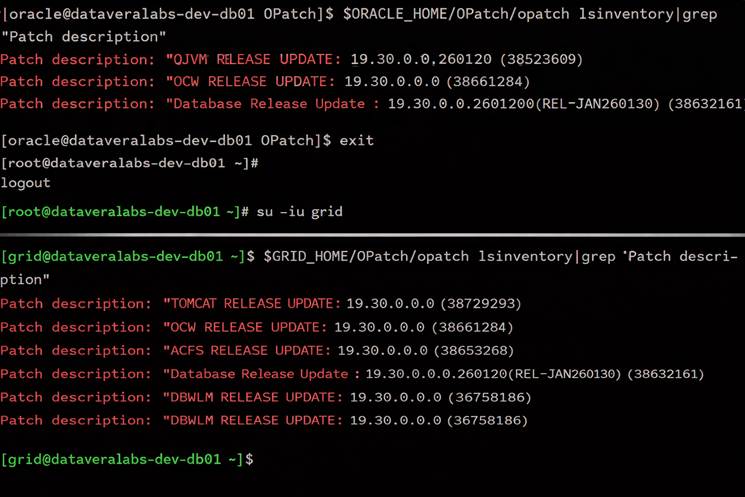
Database and Grid home patched successfully
Caution
The information provided in this document is intended for educational and internal reference purposes only. Although the procedure has been tested internally, no guarantee is provided that it will behave identically in every environment. Use this guide at your own risk and always validate the complete process in a test environment before applying it to production systems.